
Keep your network dashboard greener with a custom node status policy
Tired of seeing false red or yellow alarms in your monitoring dashboard? The Custom Node Status Policy helps you cut through the noise with flexible status display handling of devices with irregular uptime. Stop unnecessary red and yellow alerts - transform your dashboard into a true reflection of network health.
NetCrunch introduces a game-changing feature for network admins: the Custom Node Status Policy. Unlike traditional up/down monitoring, this offers you the necessary flexibility to define statuses that make sense for devices that aren’t always online.
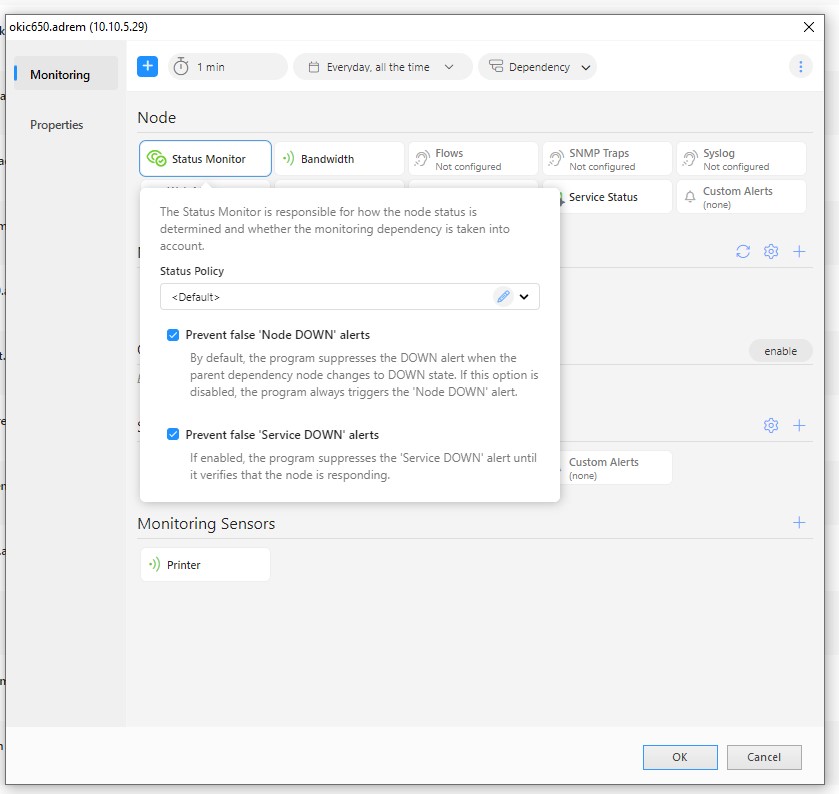
With flexible policy settings in the Status Monitor section of the Node Settings window, you can keep your performance dashboard accurate, reducing false alarms and focusing on what really matters.
Why Custom Node Status Policy Matters
In older monitoring systems (including NetCrunch versions before 14), a node would be marked as ‘down’ if all its monitored services failed. That might work for critical servers, but what about laptops, printers, or service vehicles that naturally go offline?
With NetCrunch 15 and newer, you can stop treating every offline device as a failure. Instead, you can customize policies to focus on actual problems—like a low disk space alert or an outdated antivirus definition—rather than just whether a device is connected or not.
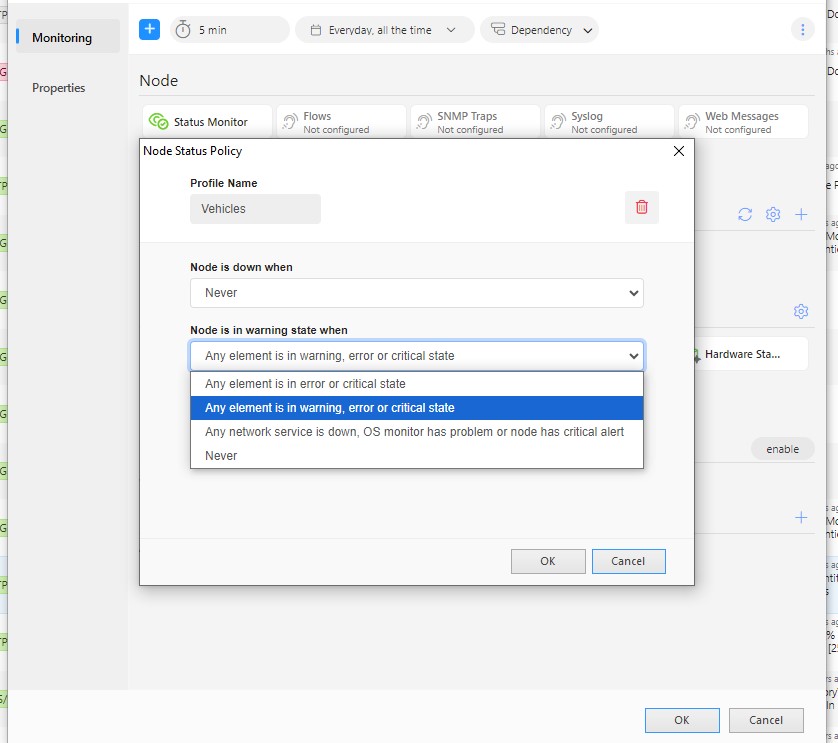
How It Works in Real Life
The Custom Node Status Policy is perfect for devices that don’t need constant uptime monitoring. It is also suitable for devices that are up or connected only at specific times. Here’s how it helps in different scenarios:
- Laptops
Sales teams and remote workers don’t always have their laptops online, but that doesn’t mean they’re “down.” Instead of flagging them offline, you can track disk space, antivirus status, or security updates as the real indicators of the node's health. Just apply the Antivirus Monitoring Pack or Disk Monitoring Pack to fine-tune status calculations for these devices. - Printers
Ever had a printer show up as ‘down’ just because it’s in sleep mode? That clutters your dashboard with useless alerts. With a custom policy, you can track ink levels, paper jams, or toner status instead of connectivity. Printer sensor metrics let you define what matters for these devices. - Service Vehicles
Police cars, ambulances, and other mobile units don’t always have a steady internet connection—tunnels, underground garages, and remote areas can cut them off temporarily. Instead of marking them offline, focus on fuel levels, maintenance schedules, or other data to keep the right insights front and center.
Why You Should Use Custom Node Status Policies
Implementing a custom status policy helps you:
- Reduce false alarms – No more unnecessary red alerts for devices that naturally go offline.
- Improve network visibility – Focus on real performance metrics instead of just connectivity.
- Make better decisions – Prioritize issues that actually impact operations.
Final Thoughts
NetCrunch’s Custom Node Status Policy puts you in control of how devices are monitored. Whether it's remote laptops, printers, or mobile units, you get a smarter way to track what really matters—without drowning in false alerts.
Keep your network monitoring efficient and your dashboard green this spring and beyond.
