Real-time monitoring for networks that keep growing
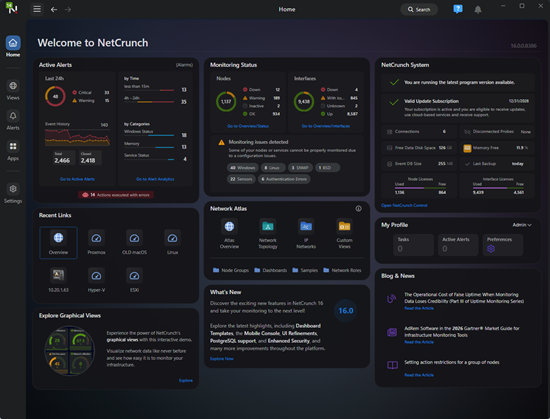
Monitor everything - across systems and the cloud. Over 730 built-in, agent-less targets enable you to track switches, servers, applications, and remote networks.
Replace plugins with built-in power. NetCrunch covers availability, traffic, performance, and logs — all in one platform.
Scale with automation and smart policies. Handle growing networks with secure access, flexible rules, and minimal setup.
Gain clarity through real-time visibility. Dashboards, maps, and zero-click summaries keep you instantly informed.
Correlate real events, not noise. Detect missing activity, abnormal patterns, and linked failures across your network.
Spot issues before they escalate. Utilize adaptive thresholds and intelligent logic to identify early warning signs.
Automate every alert response. Escalate, delay, suppress, or run scripts - no manual babysitting needed.
See context, not just symptoms. Every alert includes the what, where, and why - instantly actionable.
Visualize your infrastructure instantly. Auto-generated topology maps and node views show real-time relationships and status.
Build dashboards that make sense. Track bandwidth, availability, and key metrics in views tailored to your teams.
Stay ahead with live data overlays. No refresh needed — maps and dashboards update in real time as events unfold.
Skip the plugins and integrations. Everything is built-in - from traffic maps to interface charts to custom gauges.
OTLP & REST Telemetry Support Ingest metrics and logs from any source — no agents or plugins required.
Configuration Change Monitoring Back up device configurations and automatically detect unauthorized or risky changes.
Smart Alert Correlation and Escalation Trigger actions based on multiple conditions, time windows, or missing events, with built-in escalation logic.
Zero Trust VPN-Like Access Built-In Secure browser-to-server tunnel — no inbound ports, proxies, or VPN setup.
Automatic Layer 2 Topology & VLAN Maps Visualize port traffic, heatmaps, and interface health in real time.
Dynamic Views & Auto Grouping Organize nodes by tags, OS, or location — views update automatically.
| Feature | NetCrunch | PRTG | WhatsUp | SolarWinds Orion |
|---|---|---|---|---|
| Coverage Breadth | ||||
| Infrastructure Monitoring | ||||
| Topology Mapping | ❌ | |||
| Custom Dashboards | ||||
| Policy-Based Configuration | ||||
| Licensing Predictibility | ||||
| Real Cost Advantage |
■ = capability depth | ❌ = not available
NetCrunch includes built-in flow analysis, configuration monitoring, OTLP support, and topology mapping in one platform. Other tools split these across add-ons, separate products, or do not offer them at all.
See the full comparison →
Stop stitching plugins together. Start monitoring smarter.
Best Value — Everything Included From advanced alerting to L2 topology and NetFlow monitoring. No upsells, no add-ons.
Subscription or Perpetual License Select the model that aligns with your strategy and maintain complete control over how and when you scale.
Scale Without Penalty Grow or shrink your license at renewal without lock-in, and without overpaying.
Enterprise Packages Available Monitor up to 10,000 nodes and 100,000 interfaces, all on a single modest server.
“We’re feeding data from Acronis, BeyondTrust, and Palo Alto into NetCrunch dashboards — it’s become our central view of everything. The flexibility to visualize external telemetry is a game-changer.”
"The agentless setup and automatic discovery saved us weeks. NetCrunch delivers a clear, live view of the entire infrastructure without the usual complexity.”
"We have found in NetCrunch a complete monitoring tool which is very effective in adapting to our IT needs. NetCrunch offers powerful native network mapping and configuration capabilities, both effective and granular. "
"The features that distinguish NetCrunch from other solutions are its agent-less capabilities and the powerful, customizable dashboard with real-time network views."
"Thanks to the inheritance function and Monitoring Packs in NetCrunch, laborious configuration of every single node is the past now."
"The views in new NetCrunch are so easy to follow and work with. The design of the GUI is definitely very intuitive."
We built NetCrunch for larger environments from the start, while other tools still relied on manual setup. It looked like overkill then, but today it's a minimum.
Monitoring 20–30 devices is one thing, but real businesses deal with thousands of nodes and hundreds of thousands of changing metrics. That scale demands a real network monitoring platform — not plugins or a stack of stitched-together tools.
Collecting data is not enough. You need to understand the environment, anticipate issues, and act before they spread. NetCrunch combines auto-discovery, dashboards, real-time alerting, and network mapping in one system.
Many of our customers come from legacy systems expecting weeks of configuration and too many manual steps before they can see anything useful. Too many tools have trained teams to think monitoring has to be slow and fragmented.
It does not have to work that way. That is why we offer free initial setup assistance — so teams can quickly see how much NetCrunch can do in a short time.
We built unique features such as NetCrunch Connection Cloud, our secure built-in cloud relay for remote access between server, console, and probes, or our graphical views, which combine live dashboards with custom diagrams in one system. Add up things such as
and NetCrunch becomes a complete IT infrastructure monitoring platform in one package.
And here’s the difference: we solve real problems and fix them fast. We focus on what production teams actually need, and we ship it when it matters — not years later.
We deliver and support every customer as if production matters. Everything is there from the start — no modules to chase, no system upgrades, no data to migrate later.
Do I need to install agents on every device?
No. NetCrunch is agentless by design. It discovers and monitors devices using SNMP, WMI, APIs, and other protocols — no installations required.
Can I embed or share dashboards outside my team?
Yes. You can share read-only views with external users or embed live dashboards in other portals using simple links or iframes.
Is setup really fast, even at scale?
Yes. We offer optional free setup help, and NetCrunch is designed for large-scale deployment from the start. You can onboard thousands of nodes without scripting or plugins.
What makes NetCrunch different from tools like PRTG or WhatsUp?
It’s truly all-in-one. No plugins, no hidden modules, no "you'll need another product for that." Everything from traffic flow to alerting to dashboards is built in.
What if I need to grow, will I have to reinstall?
No. NetCrunch upgrades between editions without reinstallation or data loss. Just apply for a new license key, and you're set.
NetCrunch vs PRTGMove beyond sensor limits, manual sprawl, and costly growth. View comparison
NetCrunch vs SolarWindsReplace module bloat, heavy infrastructure, and slow legacy UX. View comparison
NetCrunch vs WhatsUp GoldGet deeper monitoring, real-time visibility, and simpler scaling. View comparison