
NetCrunch AI Explain: Real AI That Turns Alerts Into Understanding
NetCrunch's AI-powered assistant instantly translates alerts into meaningful insights. It's built into NetCrunch and works out of the box for every alert - predefined or custom - helping IT teams see what happened, why it matters, and how to fix it, all while keeping every piece of user and infrastructure data 100% private.
Smarter Monitoring Starts With Understanding
In the fast-paced world of IT operations, alerts can pile up faster than they can be analyzed. NetCrunch AI Explain cuts through that noise by making every alert instantly understandable. This AI-driven feature transforms technical alerts into clear, human-language explanations right inside the Event Details window. It gives administrators the “why” behind each event, saving time and turning raw data into clear decisions.
AI Explain is not just a tooltip or a summary. It’s a built-in partner that reads every event in context and tells you what’s really happening across your monitored environment, without exporting your monitoring data anywhere.
Unlike many “agentic AI” announcements that arrive as tech previews and roadmaps, AI Explain has already been part of NetCrunch since mid-2024: it’s there from day one, for every alert you define.
From Metrics to Meaning With One Click
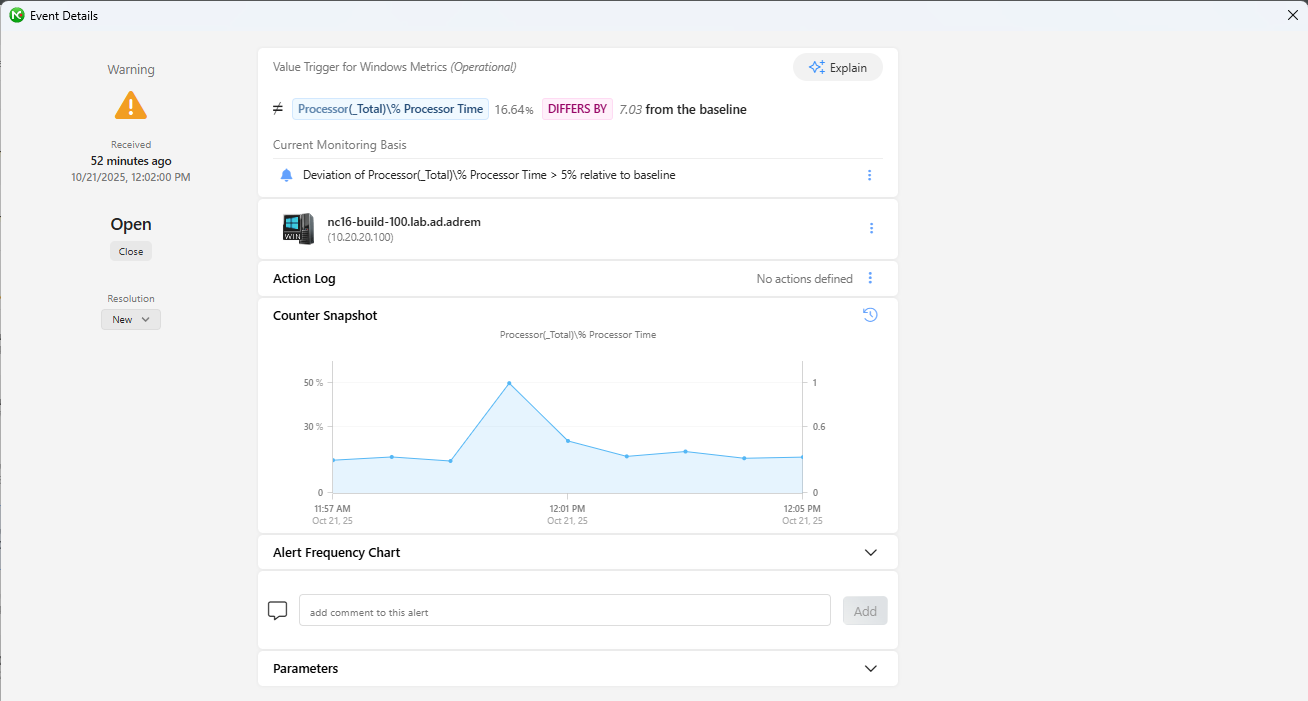
When an event appears in NetCrunch, users can now click the AI Explain button located next to the triggered metric.
For example:
Processor(_Total)% Processor Time → DIFFERS by 7.03% from the baseline
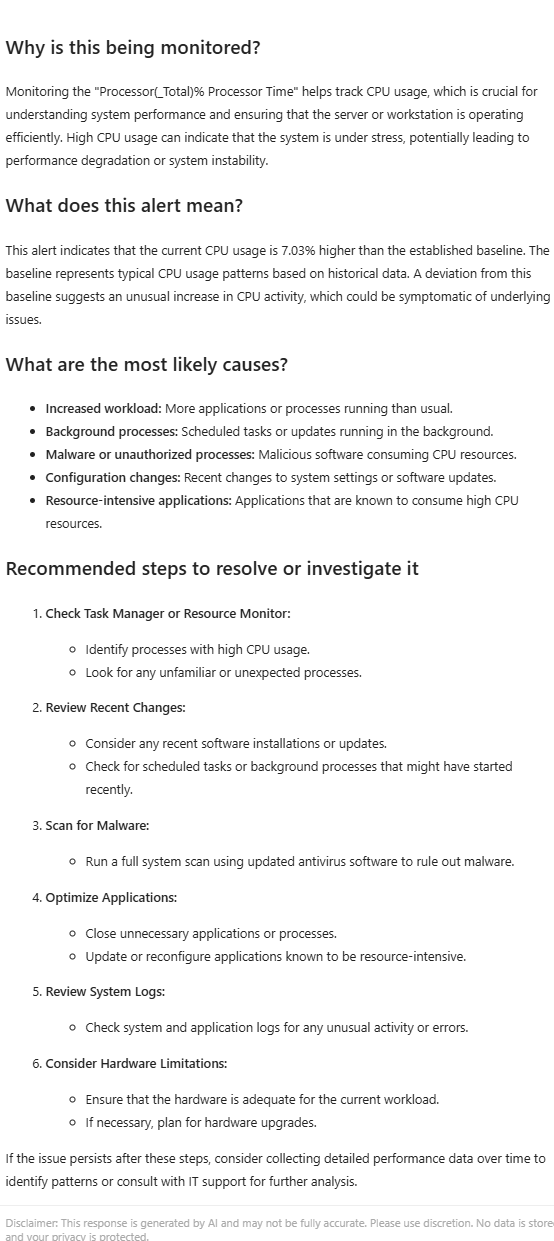
The AI Explain panel instantly opens, displaying an easy-to-read narrative that describes:
- What the alert means
- Why it occurred
- What the deviation suggests
- Which factors could be contributing
- Recommended actions to take next
Instead of jumping between dashboards, charts, and documentation, AI Explain summarizes the story behind the numbers so teams can focus on resolving the issue rather than researching it.
What AI Explain Actually Tells You
AI Explain doesn’t just define a metric; it guides you through the event the way an experienced admin would. For an alert like PhysicalDisk(_Total)\% Disk Time 175.78% > 90%, AI Explain in NetCrunch can outline:
- Why this is monitored – how disk utilization affects performance and user experience,
- What this alert means – that the disk is saturated and becoming a bottleneck,
- Most likely causes – from high I/O processes and scheduled tasks to fragmentation or hardware issues,
- Recommended steps – which tools to use, what to check, and when to consider upgrades.
All of this is generated in the context of the specific alert condition that fired, helping you diagnose and troubleshoot hands-on, not just read a generic definition.
How AI Explain Works — Intelligence With Integrity
AI Explain uses the context from alert parameters and conditions already stored in the local NetCrunch system. This ensures that explanations are precise, tied to the actual alert, and tailored to your environment.
While AI Explain uses AI to generate its text, no sensitive information is ever shared externally. NetCrunch does not transmit performance data, node information, IP addresses, or any details that could reveal your hardware or network structure. The AI receives only a short, abstracted description of the alert type - not the underlying data - so you get AI-powered understanding with zero identifiable data exposure.
Example in Action
Imagine an alert triggered by increased CPU usage. Clicking AI Explain produces a summary like:
This alert indicates that the CPU usage on the server has exceeded a predefined threshold. It suggests that the processor is under heavy load, which could impact the server's ability to perform tasks efficiently.
This human-readable explanation is paired with recommended actions, allowing any team member - from junior administrator to senior engineer - to take immediate, informed steps, directly from the event that triggered the alert.
Why AI Explain Changes the Game
AI Explain transforms the way IT teams interact with monitoring data.
It brings the clarity of human language to the precision of machine analytics. The result is faster reactions, fewer escalations, and a more confident operations workflow.
- Instant clarity – Understand every alert in seconds, without deep-dive analysis.
- Operational speed – Identify causes and actions faster, directly from the Event Details.
- Team empowerment – Help less-experienced staff make informed decisions confidently.
- Privacy-first AI – Explanations are generated without sharing any identifiable data.
- Continuous learning – Turn every event into a knowledge-building experience.
AI Explain is not just another feature. It’s a bridge between complex monitoring data and the people who act on it - available on every alert from the moment NetCrunch starts monitoring.
Data Privacy You Can Trust
At the core of AI Explain lies a strict commitment to data protection.
Even though it uses AI-assisted interpretation, AI Explain never sends performance data, node information, IP addresses, or device metadata outside the system.
Every AI query is constructed so that no information can be revealed about your network’s identity, structure, or components: only an abstracted alert description is sent. Your monitoring insights stay yours - always local, always secure, and always under your control.
Designed for Modern IT Teams
AI Explain adds the intelligence and simplicity modern IT environments demand.
It’s built for speed, clarity, and confidence - helping teams move from reactive troubleshooting to proactive management.
By making every alert understandable at a glance, AI Explain turns NetCrunch into not just a monitoring tool, but a practical decision support system for day-to-day operations, without requiring any additional setup.
Conclusion
NetCrunch's AI Explain redefines how teams experience network monitoring by making every alert self-explanatory. It uses AI to give every alert a voice - clear, concise, and completely private. With AI Explain, IT professionals gain instant understanding, faster response, and peace of mind knowing that no monitoring data ever leaves their environment.
It’s smart, secure, and already built into NetCrunch today, while others are still announcing what their AI will do tomorrow.
