
Distributed Monitoring
Learn about monitoring probes that expand on-premises monitoring into distributed environments across multiple sites and address spaces
NetCrunch allows distributed monitoring using Monitoring Probes. The probe is a single agent installed remotely and can monitor an isolated network without additional agents.
Monitoring Probes can also be installed at the same location as the NetCrunch Server, and you can offload the network monitoring to additional probes with a single click.
The Concept
We designed distributed monitoring to integrate with the existing monitoring concept seamlessly. If the node is located in a separate address space, its address includes an additional suffix.
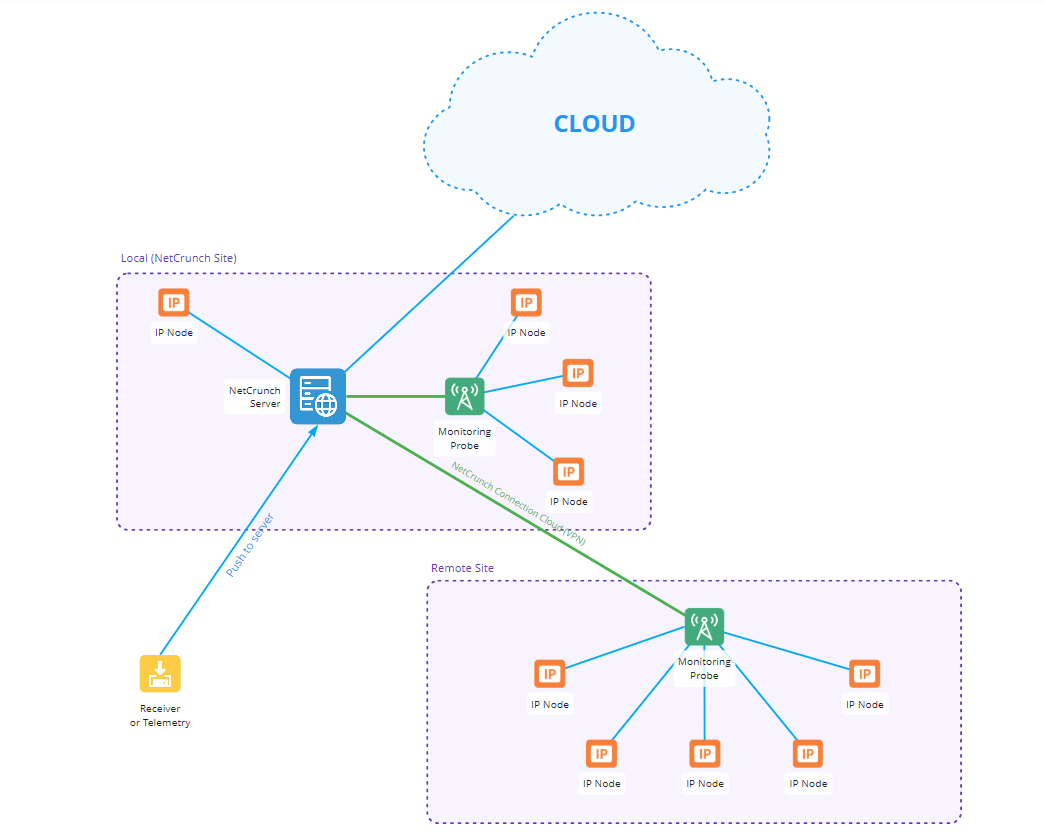 the above diagram has been created in NetCrunch
For example:
- When you see
192.168.0.234, it means it's the network address local to NetCrunch (Local - NetCrunch Server) - Where
192.168.0.234@New Yorkis the address located in theNew Yorkaddress space
Sites
Site is a group of private networks usually behind NAT. When two locations use the same private network address, they create two distinct address spaces.
Monitoring Probe
Monitoring Probe is a monitoring agent software installed on a separate machine to increase the monitoring capabilities of the server or monitor a remote location within isolated networks otherwise not accessible by the primary monitoring system. It connects to the parent system.
The monitoring probe provides all monitoring and scanning features except the flow collector.
A probe can also keep monitoring while it is disconnected from the server, buffering its results locally and synchronizing them on reconnection. See Probe Offline Monitoring Mode.
Adding nodes to be monitored by the Monitoring Probe
- First, you should add a Monitoring Probe node to NetCrunch Atlas. It doesn't have to be installed yet.
- Add an IP Node and select your probe from the Monitoring Providers list
You can add sensors to the node and install the probe agent at any time.
Installing Monitoring Probe
- Ensure the probe's NetCrunch communication port (default 12009) is accessible. You might need to map ports on your firewall.
- Install the probe on the Windows machine. It can even be a Home edition, as it doesn't violate the Microsoft CAL license. It's an agent that will connect to the server and other machines. It should work on any Windows system, but is tested to run on Windows 10 or newer (an x64-bit system is required).
- After installing the software probe, the configurator starts automatically.
- You must log in to NetCrunch using your NetCrunch account, select the probe node, or create a new one.
- The probe agent receives an authentication token, which will be used for sending data to NetCrunch.
Connection
NetCrunch monitoring probe uses a native client protocol connection to NetCrunch that uses AES256 encryption with the Diffie-Hellman key exchange algorithm. Because the probe connects to the server, it can be located behind a NAT and use a dynamic IP address.
Data Receiver
Invalid Reference @data-sensor
So the question is: how can you use it? You need to add the Data Receiver sensor and send data to it. Read more about Sending Data to NetCrunch. You can build your agent script (in any language) or use the existing one to create a parser for a data format.
probe-auto-update
Updating Monitoring Probes
Probes keep themselves up to date. When a probe detects that the server build has changed, it obtains the matching installer and runs it without any action on your part.
The installer build version must match the NetCrunch Server build version, so a probe is never left running a build the server does not expect.
The probe looks for the installer in two places, in order:
- From the internet. The probe downloads the current Monitoring Probe installer from the AdRem Software site.
- From the NetCrunch Server. Where the probe machine has no internet access, it requests the installer from the server instead. For this to work you must place the current Monitoring Probe installer in the
ProbeInstallationFilesfolder of the NetCrunch data directory yourself — the server does not fetch it for you.
Once the installer is obtained it runs automatically and the probe reconnects on the new build.
If the probe cannot update itself — no internet access and no installer waiting on the server — a configuration issue is raised on the probe node. Check the probe node for configuration issues after a server upgrade if a probe does not come back.