
NetCrunch as an Inventory Database
NetCrunch is an inventory database as well as a monitoring system. Everything it monitors, it also records — hardware, installed software, hotfixes and your own asset data — and because it keeps looking, it tells you when any of it changes.
To monitor a machine, NetCrunch has to know what the machine is. That knowledge does not get thrown away once monitoring starts: it accumulates into a live record of the estate.
The difference from a conventional asset database is that nobody maintains this one. It is collected by the same agentless monitoring that is already running, on the same schedule, and it corrects itself. An asset list is accurate on the day it is compiled; this one is accurate today.
what-is-recorded
What Is Recorded
Every node carries its identification, address, operating system and device type from the moment it is discovered. See Auto Discovery for how nodes arrive, and Device Identification Manager for how device types are classified.
On Windows machines monitored with credentials, NetCrunch collects considerably more — automatically, with no extra configuration. See Windows Configuration - Hardware, Software, Hotfixes.
- Hardware
- Processor, memory, storage, video and monitors.
- Software
- Every installed application, with versions.
- Hotfixes
- Every installed update.
Three sensors do the collecting — Windows Hardware Config, Windows Software Config and Windows Hotfix Config — and the Windows monitor adds them by itself, using the node's Windows credentials. On a properly credentialed Windows estate the inventory is simply there.
Each runs on a schedule of its own: daily at 12:00 out of the box, with weekly and monthly also available, and a first run immediately after the sensor is added. Each also keeps 10 previous versions of what it collected, which is what makes the change detection below possible; the retention is adjustable from 1 to 999.
where-to-look
Where to Look
Per node:
Node StatusSystem ViewsHardware Node StatusSystem ViewsSoftware Node StatusSystem ViewsHotfixes
Across the estate two pages carry the same data for many nodes at once, and they answer different questions.
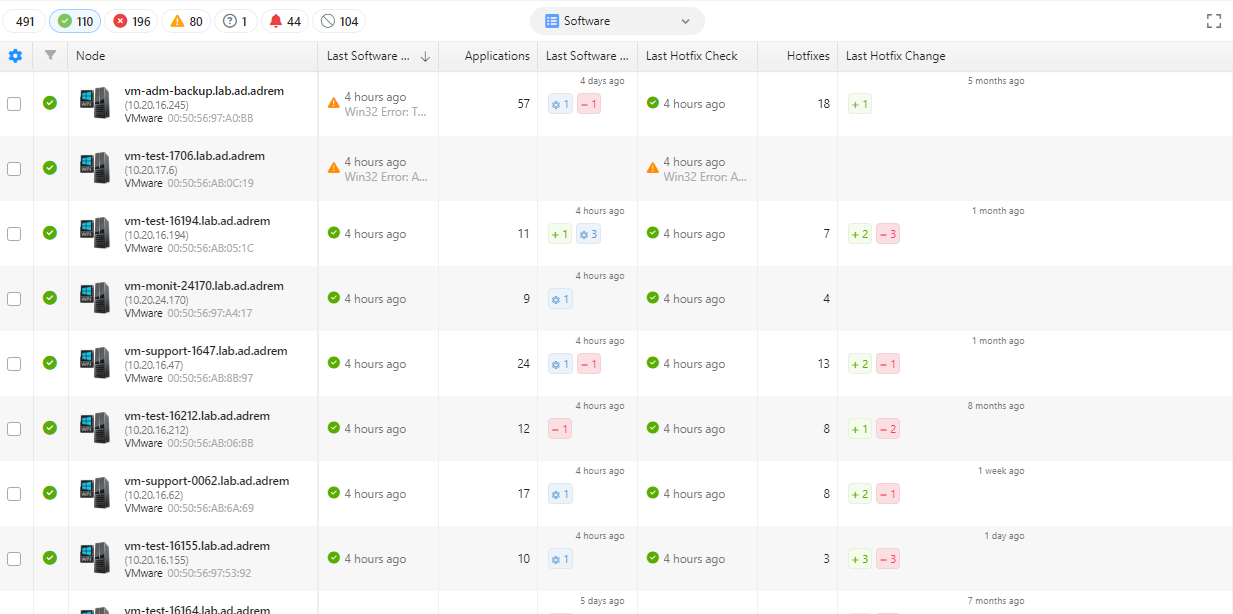
The Software view on the Nodes tab reports the state of the collection itself — when each node was last checked, how many applications and hotfixes it holds, and what changed at the last check, as plus and minus counts against the node.
Image: The Software view on the Nodes tab
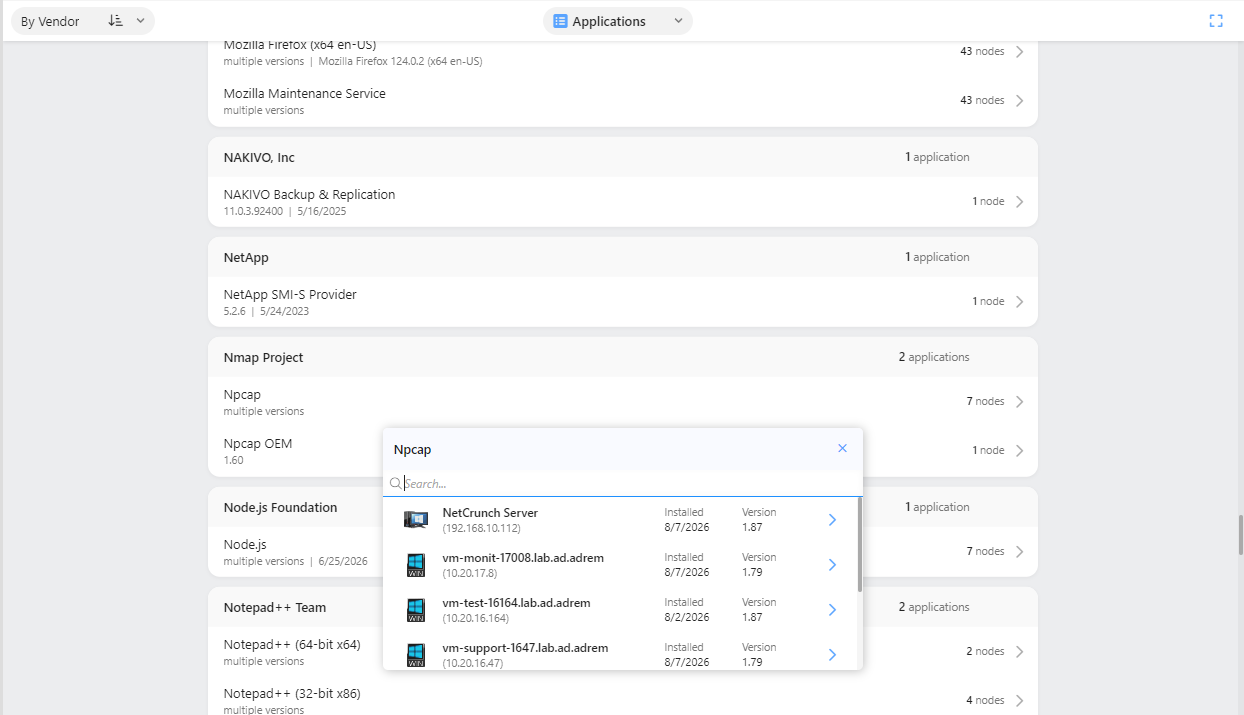
The Software page answers the question inventories are usually bought to answer: what is installed, in which version, and where? Its Applications view lists every application found in the estate, grouped by vendor, each entry carrying its version and the number of nodes that have it. An application present at more than one version reads multiple versions, and opening the entry lists the nodes that have it with the version and installation date on each — from where a node leads on to its own software page. A Hotfixes view does the same for updates.
Image: Applications grouped by vendor, with one entry opened to show its nodes and versions
change-detection
It Notices Changes
This is what a spreadsheet cannot do.
NetCrunch does not only record the current state — it compares against the last one and raises an alert when something moves:
- Hardware configuration changed
- Software installed, uninstalled or updated
- Hotfixes installed or uninstalled
The hardware alert is part of the Basic Windows Monitoring pack by default, so it is active on Windows nodes without being switched on.
Read that list again as a security control rather than an inventory feature. Software appearing on a server that nobody installed, or a hotfix disappearing, is exactly the signal an inventory system is well placed to catch and a monitoring system is well placed to alert on. The same data serves both purposes.
your-own-data
Adding Your Own Data
An inventory is only as useful as the questions it can answer, and the interesting questions are usually about things NetCrunch cannot discover: who owns this server, which contract covers it, where it physically sits, when its warranty ends.
Custom fields extend the node record with exactly that — number, text, date, time or pick list. See Managing Node Custom Data.
Two things make them more than annotation:
- They drive dynamic views. A filtering condition on a custom field builds a view that maintains itself, so "everything owned by Finance" or "everything out of warranty this quarter" stays current on its own.
- They control alerting. View membership governs which actions run, so the owner recorded against a node can decide who its alerts reach. See Action Restrictions.
boundaries
What It Does Not Do
NetCrunch inventories what it monitors. That boundary is worth stating plainly:
- Installed-software inventory is Windows only. Linux, macOS, BSD and Solaris nodes are monitored for performance and services, but nothing collects their installed packages — there is no
dpkg,rpmorpkgequivalent of the Windows Software Config sensor. SNMP devices give identification, device type and whatever their MIBs expose, which is useful but is not an installed-software list either. - A node has to be monitored to be inventoried. Something NetCrunch has never seen is not in the database, so inventory coverage is monitoring coverage.
- It is not an asset lifecycle system. There is no procurement, no purchase orders, no depreciation. Custom fields will hold a warranty date and alert you before it passes; they will not raise a purchase requisition.
For the other half of the picture — how the estate is arranged rather than what each part is — see Documenting Your Network.