
How Much Time Do You Lose Between Alert and Root Cause?
The real delay in incident response isn’t detection - it’s missing context. Dynamic folders, geo maps, drill-down network topology, Auto-Screens, controlled sharing — most teams use only a fraction of what’s already built into NetCrunch. Learn how to use those views to cut diagnostic time and make the root cause obvious.
Modern monitoring ingests more telemetry than any engineer can parse — continuously. Automation detects deviation, raises alerts, and can execute scripted escalation actions - from notifications to service restarts and remote scripts.
But automation does not decide impact - that responsibility remains human.
When an alert fires, the real question is: how large is the blast radius? Is this degradation or a complete failure? Which business function is affected? Is the issue local, regional, or systemic? And most importantly: is this the root cause, or just a symptom?
The difference between reacting and resolving is context.
Why Alert Notifications Alone Are Not Context
In many environments, monitoring effectively stops at notification.
An uplink flaps, and within seconds, multiple messages appear: the interface goes down, then comes back up; routing adjacencies drop; services time out; devices report unreachable states. Alerts propagate into shared mailboxes or chat channels, often delivered to everyone.
Triage becomes pattern recognition in a sea of noise, where the loudest alert wins. Over time, thresholds are raised to quiet noise. Alerts are muted, and teams assume that transient warnings will resolve on their own. Genuine degradation begins to hide inside the volume.
Detection occurred. Clarity did not. The issue is rarely missing data - it’s a fragmented context, where each signal exists somewhere but nowhere together.
Building Contextual Network Views
A useful view is not one that shows everything. It is one that answers a specific operational question quickly and without ambiguity.
Consider geography. When multiple branches or remote sites are involved, the first question is simple: where is the problem? A geo-based view with status overlays answers that instantly. If only one location changes state, escalation remains local. If multiple regions shift at once, upstream dependencies become suspect.
Context can also reflect organizational structure rather than network structure. Networks are not managed solely by IP ranges; they are managed by responsibility and business function. Add a ‘Department’ or ‘Branch’ field to each node, and Dynamic Views will automatically group infrastructure. No manual folders. No drift. A view labeled “Logistics Department” or “Krakow office” is not decorative - it clarifies impact in business terms, not just technical ones. As attributes change, the view updates automatically, removing the need for manual maintenance.
Context is not only reactive. It can also be preventative. A dynamic view listing nodes with SSL certificates approaching expiration transforms future risk into visible, manageable work. Instead of relying on spreadsheets or calendar reminders, engineers see impending issues directly within the monitoring environment.
In each case, the principle is the same: problem detection must be anchored to human context.
Hierarchical Drill-Down: From Topology to Interface Counters
Network Topology view in NetCrunch is not a static diagram. It is generated dynamically from SNMP data and discovery protocols such as STP, CDP, LLDP, and SNMP forwarding tables (RFC 1493).
NetCrunch builds both logical routing maps (router-to-subnet relationships) and physical Layer 2 maps (port-level switch connections). Both are live and data-driven.
If a topology looks incomplete, it usually means a device is not being monitored. Visibility drives accuracy - if NetCrunch can’t see it, it can’t map it. What you see reflects current routing and physical relationships, not a manually drawn diagram.
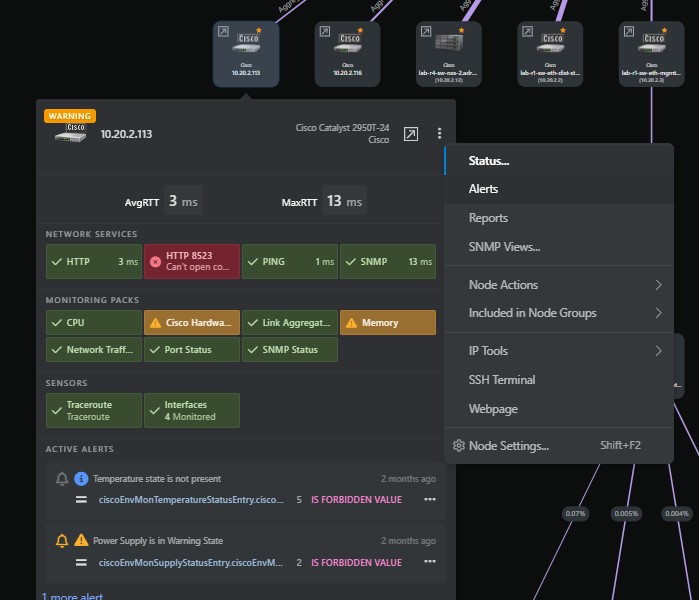
Click a device to open a consolidated panel showing alerts, services, sensors, traffic, ports, CPU, and memory - the node’s full state in one view.
From there, open the switch’s segment view to see which endpoints are attached to which port. Selecting an interface reveals live traffic, utilization, errors, discards, and historical trends. When discards increase while physical errors remain at zero, the likely cause shifts from cabling or duplex mismatch to congestion or oversubscription.
The alert stops being abstract - it becomes mechanical. The monitoring system detected a deviation, and the interface counters explain it.
Workflow Snapshots: Structured Views in Practice
The screenshots below are drawn from a test environment. They illustrate a consistent diagnostic workflow rather than a single captured incident. The goal is to demonstrate how structured views support reasoning, not to reconstruct one specific outage.
Snapshot 1: Service-Level Degradation
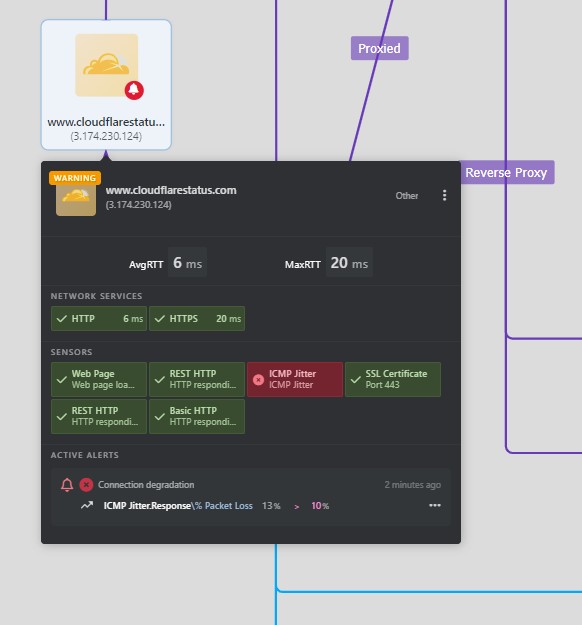
The service is reachable, but performance is degraded. The node panel confirms measurable degradation without confusing it with an outage.
Snapshot 2: Topology Context
The topology view anchors that degradation to a physical device. A device reflects a warning state. Opening its node panel reveals monitoring packs and active alerts tied to specific interfaces and services. The deviation is no longer abstract; it is anchored to a tangible network element.
Snapshot 3: Interface-Level Evidence
In the switch’s physical segment view, selecting the uplink reveals real-time traffic. Rising discards with no physical errors point to congestion — not hardware failure. The underlying mechanism becomes visible without leaving the monitoring interface.
Snapshot 4: Scope Confirmation and Controlled Visibility
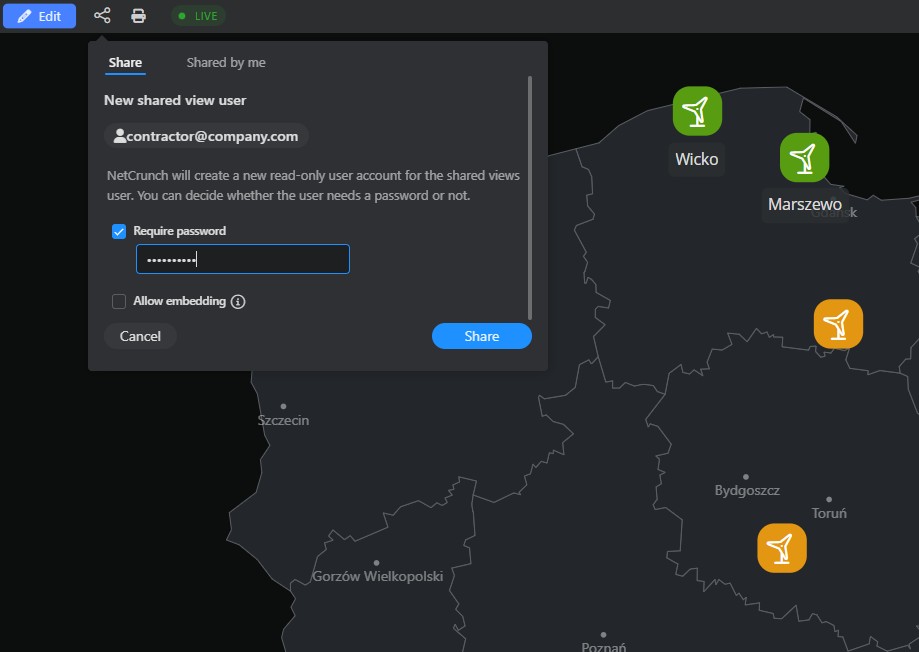
Returning to a geo or site-level view confirms whether the issue is localized or widespread. If collaboration is required, a read-only sharing link can be created for that specific view, protected by a password and limited to a set expiration date. External partners see only the relevant infrastructure segment and observe the same live data as the internal team.
What Happens Without Structured Views
Remove structured visibility, and the workflow changes completely. An alert appears. Engineers search for the device in a list. They open separate dashboards for traffic, CPU, and routing. They initiate SSH sessions and manually run interface commands. They cross-reference static diagrams or rely on memory to determine dependencies.
Everything you need is there - it just isn’t connected.
When context fragments, cognitive load rises, diagnosis slows, and alert fatigue grows.
The bottleneck shifts from detection to interpretation.
Live Visibility and Controlled Sharing
Structured views only retain value if they remain current. Static exports and report screenshots become outdated almost immediately.
Live network views in NetCrunch refresh automatically. Status overlays change as events unfold. Interface counters update continuously. Active alerts reflect the current state — not last week’s snapshot.
For NOC environments, automatic rotation of network views is deliberate and configured.
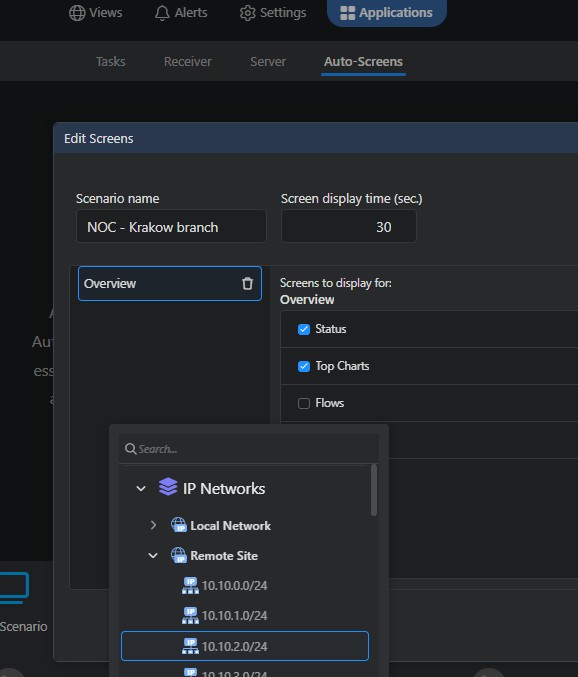
Auto-Screens cycles through selected views at defined intervals, ensuring that operators maintain visibility across segments without clutter. Only structured, non-scrollable views are included, reinforcing clarity rather than overwhelming the display.
Live sharing extends this visibility beyond the operations team. A dedicated read-only user can expose only selected views, protected by a password and limited by an expiration date, enabling collaboration without exposing the entire monitoring system.
Monitoring maturity is measured by how quickly an engineer moves from notification to root cause, without switching between tools. Monitoring should reduce uncertainty - not transfer it. That’s the difference between seeing an alert and knowing what to fix.
