
Prevent False DOWN Alerts in Network Monitoring with NetCrunch Custom Node Status Policy
Learn how Custom Node Status Policy helps you cut through the noise by providing flexible status handling for devices with irregular uptime. Stop unnecessary red and yellow alerts - transform your dashboard into a true reflection of network health.
Network monitoring systems frequently generate false DOWN alerts when devices temporarily disconnect from the network. Traditional network monitoring tools often determine device status based solely on connectivity. If all monitored services fail or the device stops responding, the node is marked as down.
This model works for always-online infrastructure such as servers or routers. However, it produces false alerts for devices that are not expected to be continuously connected.
Examples include:
- laptops used by remote employees
- printers that enter sleep mode
- vehicles or mobile equipment with intermittent connectivity
Why this matters
Many organizations stop monitoring laptops, printers, and other endpoint devices because false DOWN alerts generate too much noise and lead to alert fatigue. Custom Node Status Policy allows these devices to be monitored without flooding the monitoring system with alerts.
What Is Custom Node Status Policy?
Custom Node Status Policy is a NetCrunch feature that determines how a device’s overall status is calculated. Instead of marking a node as down whenever connectivity is lost, the policy evaluates metrics, states, service monitors, and alerts to determine whether the device actually has a problem.
This allows administrators to prevent false DOWN alerts for devices that are not expected to be continuously connected.
Quick Summary
Custom Node Status Policy allows NetCrunch to:
- prevent false DOWN alerts for intermittently connected devices
- evaluate device health using metrics and service monitors
- maintain accurate monitoring dashboards without disabling monitoring
Node Status Policy in NetCrunch
To understand how this works, it helps to understand how NetCrunch models monitored systems.
In NetCrunch, a Node represents a service endpoint (see What Is a Node in NetCrunch), not strictly a physical device. While a node often corresponds to a server, switch, or printer, it actually acts as the logical root entity to which monitoring data is attached.
This allows NetCrunch to calculate node status based on service health and monitoring data, rather than simple network reachability.
Thus, a node may represent:
- a physical device
- a virtual machine
- a cloud service
- an application endpoint
Because NetCrunch treats nodes as service endpoints, administrators can define status policies that reflect service health rather than simple connectivity.
This model also allows NetCrunch to represent telemetry endpoints, cloud services, and application metrics as nodes, even when they lack a traditional network address.
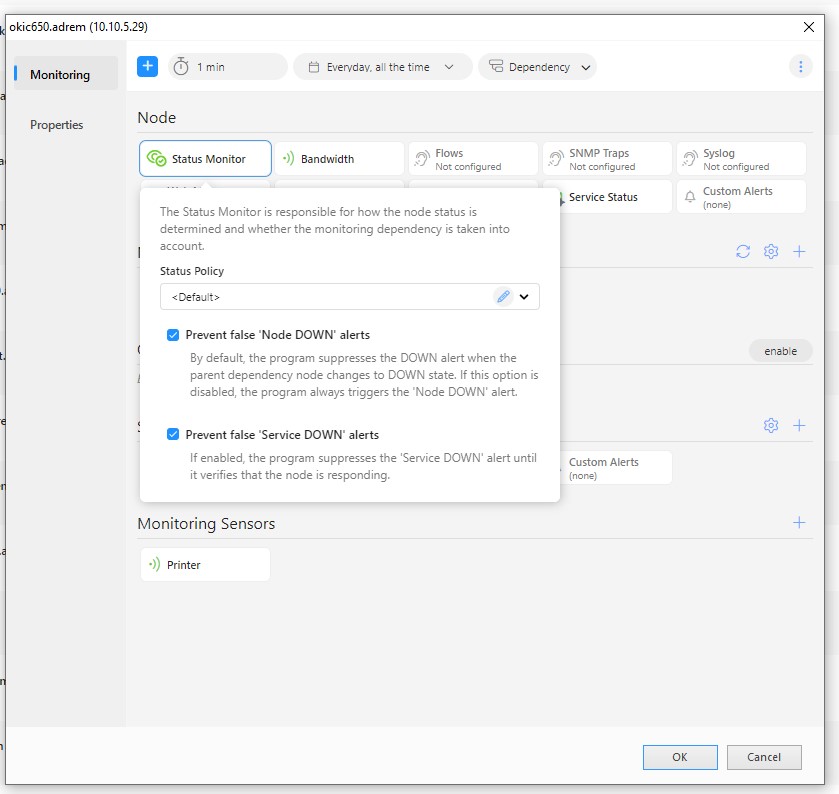
With flexible policy settings in the Status Monitor section of the Node Settings window, administrators can prevent nodes from being marked as down when connectivity is temporarily lost.
Why Custom Node Status Policy Matters
In older monitoring systems, a device would be marked as ‘down’ if all its monitored services failed. That might work for critical servers, but what about laptops, printers, or other devices that naturally go offline?
False alerts in network monitoring occur when monitoring systems interpret temporary connectivity loss as service failure.
Devices such as laptops, printers, mobile systems, or even some OT devices frequently disconnect due to sleep modes, roaming Wi-Fi networks, or intermittent connectivity.
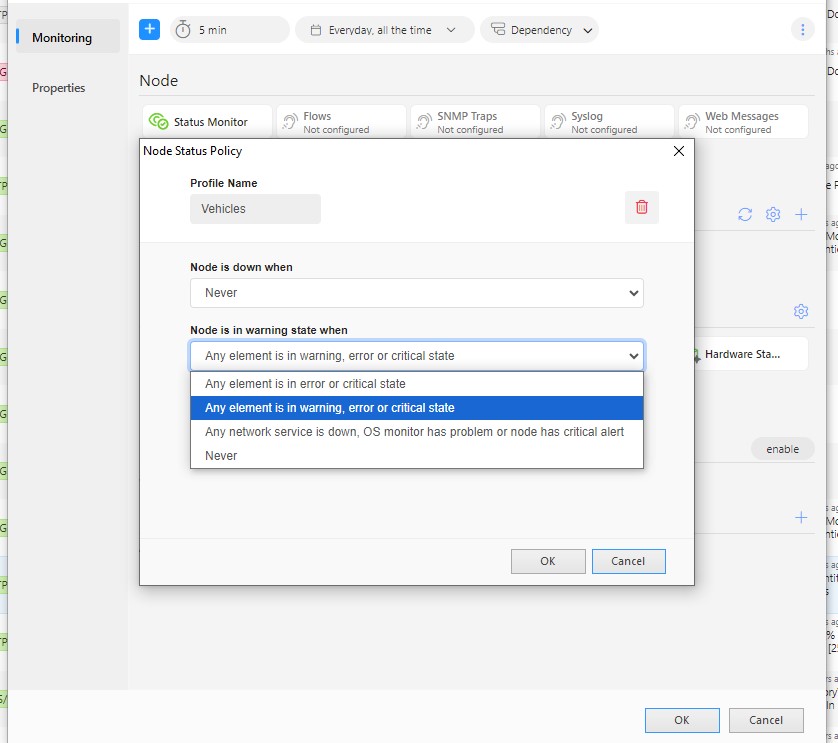
The policy is configured in Node Settings -> Status Monitor -> Status Policy. Administrators can define:
- when a node should be considered down
- when a node should enter a warning state
- which monitored elements influence the device status
Tip: Many organizations create separate status policies for device classes such as laptops, printers, and POS systems, and apply them in bulk using NetCrunch multi-selection capabilities.
For example, a node can remain operational even if it temporarily loses connectivity, while still reporting warnings for issues such as low disk space, antivirus problems, or hardware alerts. Unlike simply disabling connectivity checks, this approach preserves monitoring for important indicators such as disk space, security status, or hardware alerts.
False alerts in monitoring systems often occur when status is derived solely from connectivity checks (see Preventing False Alarms). For example, when an intermediate device fails, all dependent nodes may appear unreachable. Similarly, momentary packet loss, delayed SNMP responses, or overly sensitive monitoring thresholds can trigger alerts even though no real service outage exists.
NetCrunch includes multiple mechanisms to reduce such noise, including dependency-based monitoring, event suppression, and customizable node status policies.
How It Works in Real Life
The Custom Node Status Policy is perfect for devices that don’t need constant uptime monitoring. It is also suitable for devices that are up or connected only at specific times. Here’s how it helps in different scenarios:
-
Laptops
Employee laptops frequently disconnect from the network when users travel, switch Wi-Fi networks, or shut down their devices. In traditional monitoring systems, this generates repeated DOWN alerts. With a custom policy, NetCrunch can monitor security and health indicators rather than connectivity, such as antivirus status, disk space, or patch levels. This ensures the node status reflects the device's actual health, not just whether it is currently connected. -
Printers
Instead of relying on connectivity checks, administrators can monitor printer-specific metrics such as toner or ink levels, paper jams, or hardware alerts. The node can remain operational even if the device enters sleep mode or temporarily stops responding to network probes. -
Service Vehicles
Mobile units such as fire brigade vehicles, ambulances, or field service equipment often experience intermittent connectivity due to tunnels, underground parking, or remote locations. In traditional monitoring systems, these devices would repeatedly appear as DOWN, generating unnecessary alerts.
With a custom node status policy, NetCrunch can avoid treating temporary disconnections as failures. When vehicles reconnect, the system can assess their operational status using telemetry data from vehicle systems or onboard devices.
Telemetry-enabled devices (see Telemetry in NetCrunch) can push their data directly into NetCrunch via Telemetry Nodes, allowing systems without constant network visibility to report metrics and events when data is available.
Why You Should Use Custom Node Status Policies
In NetCrunch, alerts represent events generated by monitoring conditions (see Monitoring - Alerting), while notifications determine how those events are communicated to users (see Notifications). Reducing unnecessary alerts at the monitoring layer is essential because excessive alerts can lead to notification overload and operator fatigue.
Custom node status policies help ensure that alerts reflect real operational issues rather than expected connectivity changes. This does not suppress monitoring data; it changes how node status is calculated so alerts reflect meaningful service conditions rather than simple connectivity loss.
Implementing a custom node status policy helps:
- Reduce false alerts caused by temporary connectivity loss
- Keep monitoring dashboards accurate for intermittent devices
- Focus attention on real operational issues instead of network noise
When to Use Custom Node Status Policies
Custom policies are especially useful for:
- laptops, tablets, and remote workstations
- printers, cash registers, POS systems, and IoT devices
- mobile or vehicle-mounted equipment
- devices that connect only during scheduled windows
Applying Node Status Policies to Multiple Devices
One reason many organizations avoid monitoring endpoint devices is the operational overhead. Configuring monitoring rules for hundreds of laptops, printers, or POS systems individually can quickly become impractical.
NetCrunch simplifies this process by allowing administrators to modify node settings for multiple devices at once (see Managing Multiple Node Settings). Custom Node Status Policies can be applied to entire groups of nodes in a single operation.
For example, administrators can define different status policies for:
- laptops used by remote employees
- network printers that frequently enter sleep mode
- POS terminals or kiosks operating during scheduled hours
These policies can then be applied to all devices in each category simultaneously using NetCrunch’s multi-selection and bulk node configuration capabilities (see Using Multiselection and Search to Speed Up Tasks in NetCrunch).
This makes it practical to monitor large groups of intermittently connected devices without generating excessive false alerts.
Many monitoring systems generate excessive alerts when endpoint devices disconnect, which is why many organizations exclude these devices from monitoring entirely.
Instead of avoiding endpoint monitoring entirely, organizations can expand their monitoring scope while keeping alert noise under control.
Key Takeaway
Custom Node Status Policies allow NetCrunch to calculate device status based on service health and monitoring data, rather than simple reachability checks. This prevents false alerts for intermittently connected devices while ensuring real operational problems are still detected.
Final Thoughts
NetCrunch’s Custom Node Status Policy puts you in control of how devices are monitored. Whether it's remote laptops, printers, or mobile units, you get a smarter way to track what really matters - without drowning in false alerts.
This approach aligns with NetCrunch’s broader service-based monitoring model, where monitoring focuses on service availability and operational data rather than just device reachability.
Custom Node Status Policies work together with other NetCrunch mechanisms designed to reduce alert noise, including Event Suppression and Dependency Monitoring.
Combined with NetCrunch’s service-based monitoring model, this allows administrators to measure availability based on service health rather than simple network reachability. The result is monitoring that reflects real operational conditions instead of generating unnecessary alerts.
Read more about Expanding the Monitoring Horizon with NetCrunch
